You cannot protect
what you do not know you have.
An asset register with 25 asset types, each with its own details, linked to the tasks that protect them. Connect your cloud accounts and Cloud Management keeps the cloud inventory, its posture and its evidence current.
Asset Management · assets linked to the work
Applications
Linked to tasks
Databases
Linked to tasks
Servers
Linked to tasks
APIs
Linked to tasks
Cloud
Linked to tasks
Third parties
Linked to tasks
Illustration. 25 asset types are supported; six are shown.
- 25 types
- From APIs and databases to data centres
- Bulk upload
- Bring your existing register in
- Asset to task
- AI-suggested links to the tasks that protect each asset
- Cloud-aware
- Cloud resources join the register through Cloud Management
From what you own to the controls it proves
Assets and cloud resources sit on the same record as tasks and controls.
- 1
Register assets
25 types, added one by one or in bulk.
- 2
Connect clouds
Cloud accounts linked through integrations.
- 3
Collect
Resources gathered hourly or when you ask.
- 4
Check
Configuration checked against security policies.
- 5
Map to controls
Results counted as evidence for framework controls.
Asset register
Every kind of asset, with the details that matter for it
Assets are grouped by type, each with type-specific details, so a database, an IoT device and an office environment are each described properly.
- Types include APIs, applications, audit logs, backup systems, data centres, databases, IoT devices, networks and office environments
- A count for each type, so gaps in the register are obvious
- Add assets one at a time, upload them in bulk, or export the inventory
Asset to task
Know which work protects which asset
Netra AI suggests which tasks apply to each asset. Your team confirms the link, so you know where to act and which evidence applies.
- Suggestions, not automatic changes: a person confirms each link
- Tasks show the assets they were performed on
- Auditors can follow a control to the systems it covers
Example: one asset, connected
The register
Everything the organisation owns, with a person against it
Type and criticality decide what has to be done about an asset. The owner is who answers for it. Both are on the row, because an asset nobody owns is a gap waiting to be found.
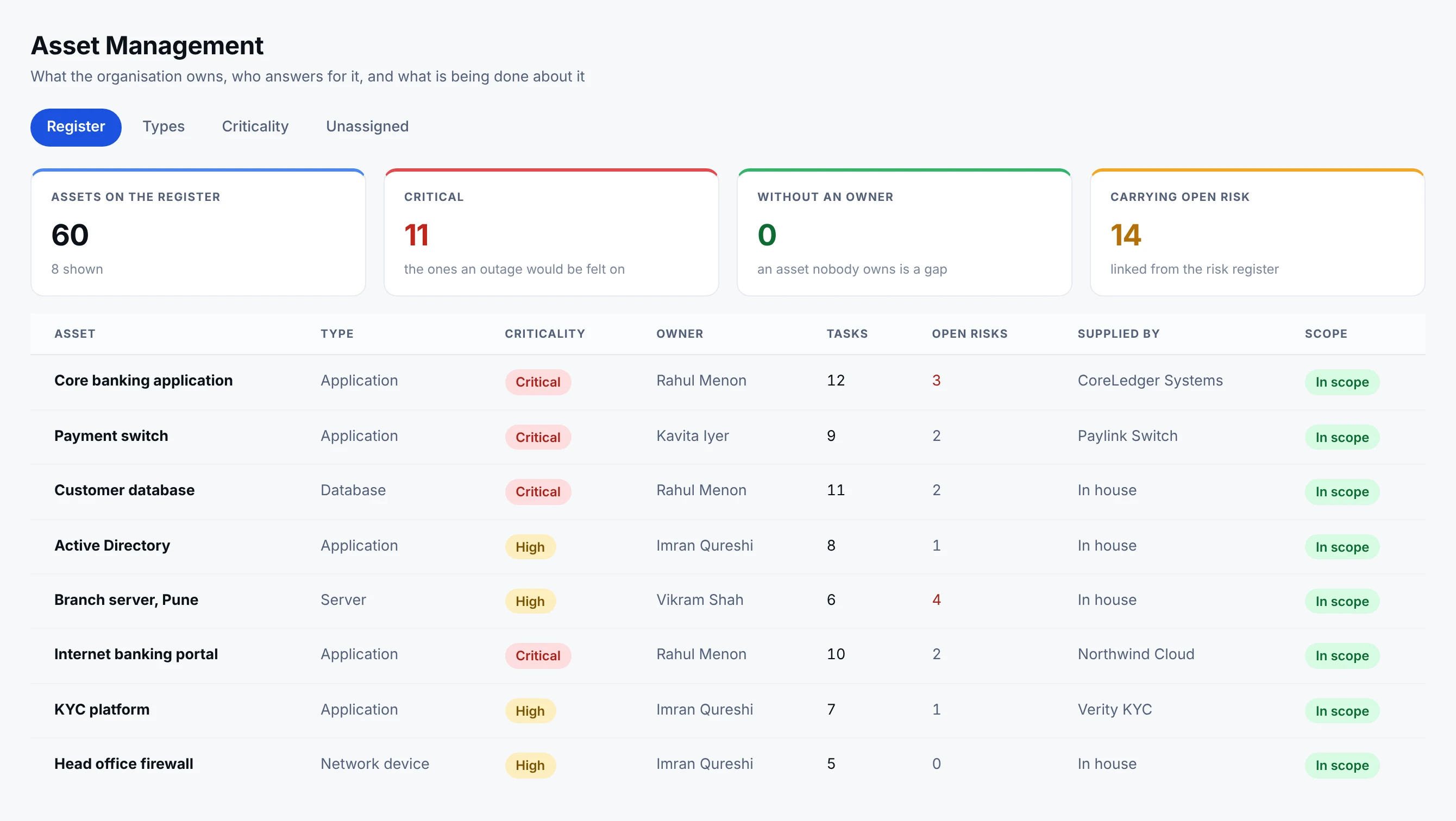
- 1No asset without an ownerZero unassigned. An asset nobody owns produces tasks nobody does, which is how a register quietly stops being true.
- 2Criticality drives the workCritical assets pull a deeper set of tasks on a shorter cycle. The register makes that automatic rather than a judgement made again each year.
- 3The supplier is on the rowWhere a vendor stands behind an asset, the two records are linked, so a weak vendor and a critical asset are one conversation.
Criticality is not a label for a report. It decides which tasks the asset pulls and how often they repeat. The open risk count comes from the risk register, and the supplier column is the same vendor record Third-Party Risk works from, so an asset supplied by a vendor rated D is visible from both sides.
What the link buys you
Three things that are impossible without it
An asset register that is not wired to the work is an inventory. Wired to it, the same register answers questions no spreadsheet can.
A risk profile per asset
Risk is carried by the systems that would actually suffer, so the core banking platform and a meeting room display do not read the same.
Evidence per asset
The proof a particular system needs can be asked for and held against that system, from the Task Engine or from the asset record.
A control that names its scope
Which systems does this control cover is the first question an auditor asks. The link is the answer, rather than a paragraph somebody writes.
The link that makes the rest work
Every asset linked to the work that protects it, one asset at a time
This is the link the whole programme leans on. Link an asset to a task and three things follow: the organisation can carry a risk profile per asset rather than per department, the evidence a particular system needs can be asked for and held against that system, and a control can finally answer the question an auditor opens with, which systems does this actually cover. Netra AI proposes the links and shows its reasoning; a person decides.
- Netra · Task · Link assets, by asset
Down to the individual asset, which is the level that matters
Fourteen of twenty log sources suggested, each scored, each with its own switch and its own citations. Linking at this level is what lets the core banking audit logs carry different evidence and a different risk weight from a meeting room display. A type-level link would say the organisation has logs; an asset-level link says which ones, and what each of them still needs.
- Netra · Task · Link assets
It starts by narrowing the register
Before the individual assets, the types are scored: audit logs, documentation and storage at a hundred, network infrastructure at eighty-two. Beside each score is the reasoning in plain words and the quoted lines it came from, including the CERT-In direction requiring logs to be retained for a rolling 180 days within Indian jurisdiction. It is a way into a register of sixty assets, not the link itself.
Assets and the work
An asset register that is wired to the work
An inventory on its own proves nothing. In Netra each asset is linked to the tasks that protect it, and the evidence is attached where the link is made.
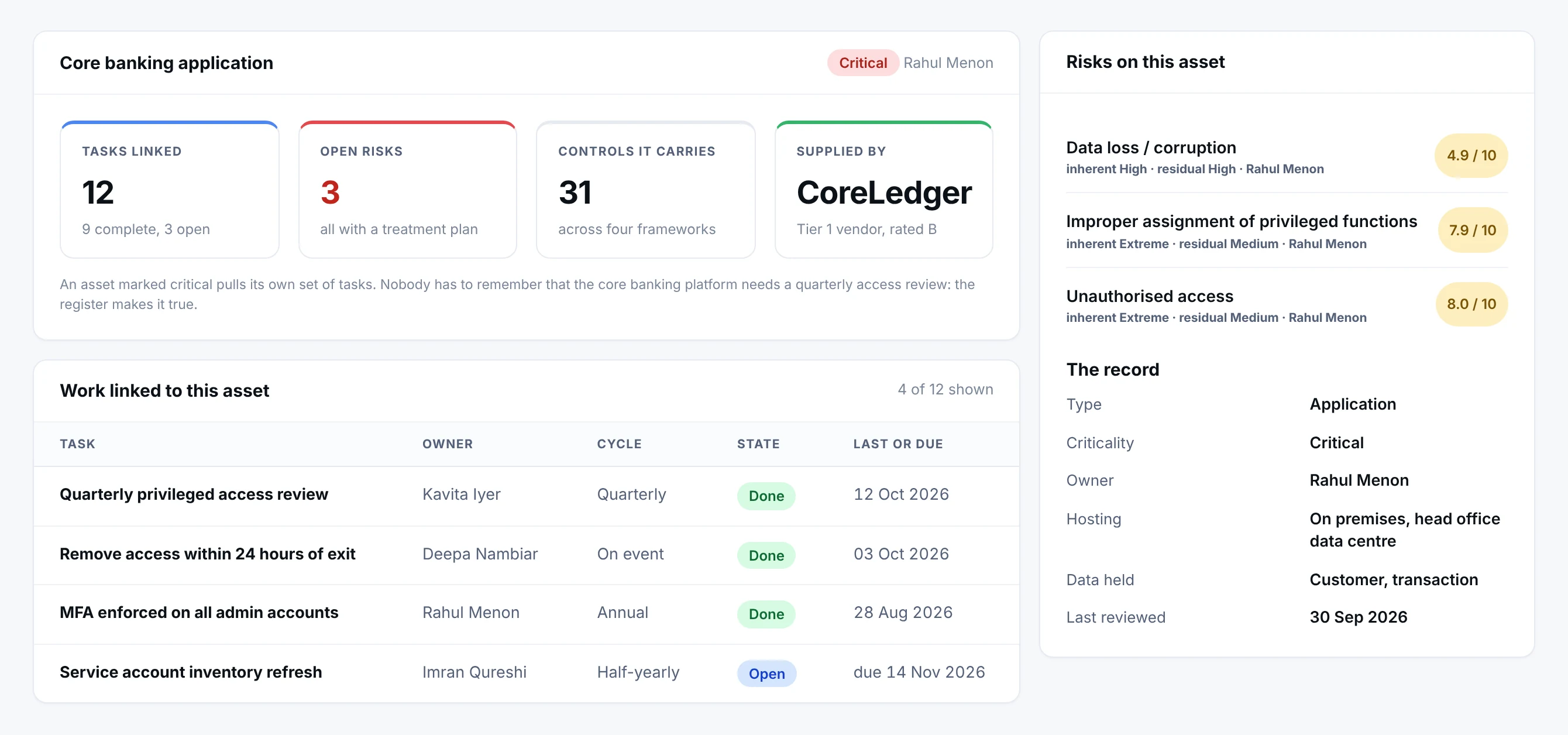
- 1The work this asset pullsTwelve tasks are linked to the core banking platform, nine of them complete. An asset marked critical pulls its own set of work; nobody has to remember it.
- 2Risk, on the assetThree open risks sit on this record, each with a treatment plan. A risk register that is not wired to assets cannot answer what an outage would actually cost.
- 3Open risks, in fullThe same risks the register holds, read from the asset’s side, with their inherent and residual scores and the person who owns each one.
- 4Which systems a control coversThis is the question an auditor actually asks. The link between the task and the asset answers it, and the evidence is attached where the link is made.
An inventory on its own proves nothing. Here the asset carries the tasks that protect it, the risks it bears, the controls it answers for and the supplier behind it. Netra AI can suggest the asset types a task is likely to touch; a person still decides.
Asset Management in numbers
- 25
- Asset types, each with its own details
- Bulk
- Upload from a template, or add one at a time
- 1 link
- Between an asset and the tasks that protect it
- Inactive
- Retire assets without losing their history
Inside an asset
A register an auditor can read
Every asset records the same core facts, then the details that matter for its type.
Some of the asset types
- 1Name and descriptionWhat it is, in plain words.
- 2Status and criticalityWhether it is live, and how much it matters.
- 3Owner and locationWho answers for it, and where it sits.
- 4Sensitive data and audienceWhat it holds, and who it serves.
- 5Linked tasksThe work that protects it.
Bring your existing register in
Start from what you already keep, not from a blank sheet.
- 1
Download the template
One for each asset type.
- 2
Fill it in
Names, owners, criticality and the rest.
- 3
Upload
The whole list in one step.
- 4
Link to tasks
Netra AI suggests; your team confirms.
Cloud Management
Cloud resources are collected for you
Connect your cloud accounts and the cloud inventory, its posture and its evidence stay current on their own. See Cloud Management for the full picture.
Connected accounts
Collected on a schedule or on demand.
Security checks
Configuration checked against security policies.
Mapped to controls
Results counted as evidence.
Why it matters
Know what each task touches
Evidence has to come from real assets.
The usual way
- An inventory in a spreadsheet nobody trusts
- No record of which systems a task was done on
- Cloud resources discovered by accident
In Netra
- A typed register with owners and criticality
- Tasks linked to the assets they were performed on
- Cloud resources collected and checked automatically
What else is in Asset Management
Type-specific detail
Each asset type records what matters for that kind of asset.
Bulk upload
Move an existing register in without retyping it.
Inventory export
Take the register out when someone asks.
Cloud Management
Connected clouds feed the register automatically.
Retire, do not delete
Mark assets inactive to keep the history an auditor may want.
Works on the same record as
A task completed anywhere in Netra shows up here. Nothing is collected twice.
Built for
Questions about Asset Management
Why are there 25 asset types instead of one list?
Different kinds of assets need different information recorded. A database needs to record what data it holds; a firewall needs its network role; a person needs their department. The 25 types let Netra capture the right details for each, which is what makes the inventory useful - and what enables AI-suggested task mapping.
Why isn't there a fixed mapping between tasks and assets?
Because which assets a task applies to is entirely organisation-specific - it depends on your particular environment. A pre-built mapping would be wrong for almost everyone. Instead, Netra AI uses each asset's details to suggest the relevant assets for a task, and you confirm. You get the mapping without the impossible one-size-fits-all assumption.
How does linking assets to tasks help with evidence?
Evidence has to come from real assets. Once a task is linked to the assets it applies to, you know exactly which assets to collect evidence from - a config export or screenshot per asset - so your evidence is specific and complete, which is exactly what auditors sample against.
What are the base fields every asset has?
Every asset, regardless of type, records Name, Status, Criticality, Owner, and Location. On top of these, each type adds its own type-specific fields (network type, service model, data classification, and so on).
Should I delete assets we no longer use?
Prefer marking them Inactive over deleting - it preserves the history an auditor may want to see. Deletion is soft (it leaves an audit trail), but a status change keeps the record visible and explains why the asset is no longer in scope.
See Asset Management on your own frameworks
A demo with your frameworks and your kind of organisation, not a generic tour.
Next module: Cloud Management